TLDR:
- GetFeedback Direct is being sunset on 31 December 2026. If you run NPS, CSAT, CES or lifecycle surveys through Salesforce-connected workflows, this is not a small admin task – it is a migration project.
- GetFeedback Digital is under the GetFeedback name. GetFeedback Direct is the product affected.
- SurveyMonkey offers SurveyMonkey Enterprise as one possible path, but the Salesforce operating model differs from GetFeedback Direct. That difference matters if your feedback programme is deeply embedded in Salesforce.
- Export your data now. SurveyMonkey has not published a detailed post-shutdown data retention policy for GetFeedback Direct, and other 2026 feedback-platform sunsets show why waiting is risky.
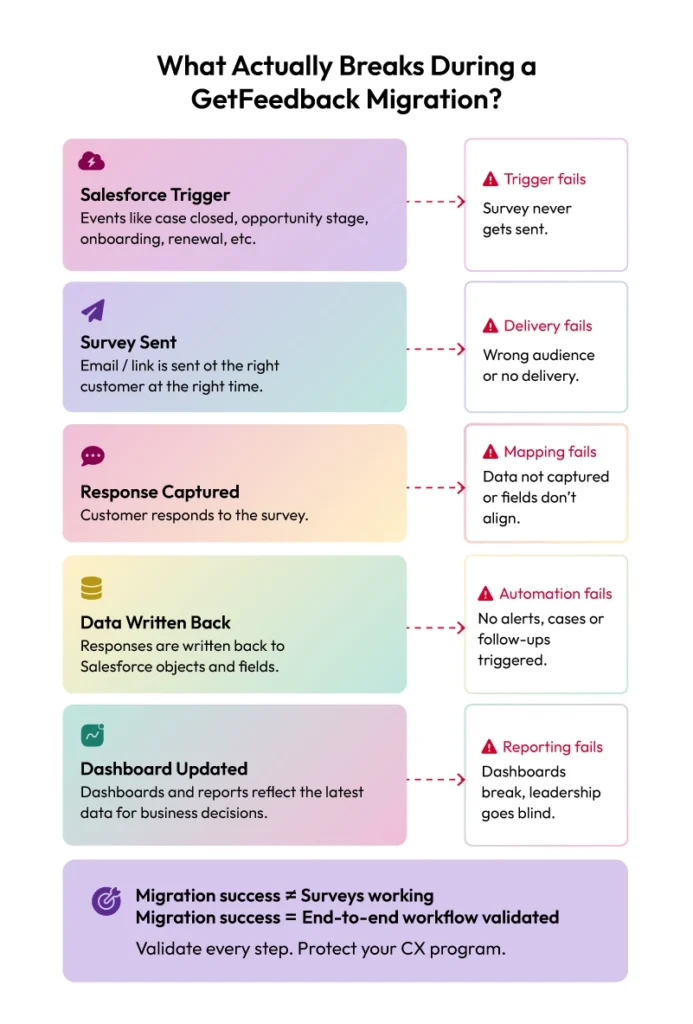
- The four things most likely to break are survey triggers, response data mapping, case creation automations, and Salesforce dashboard feeds.
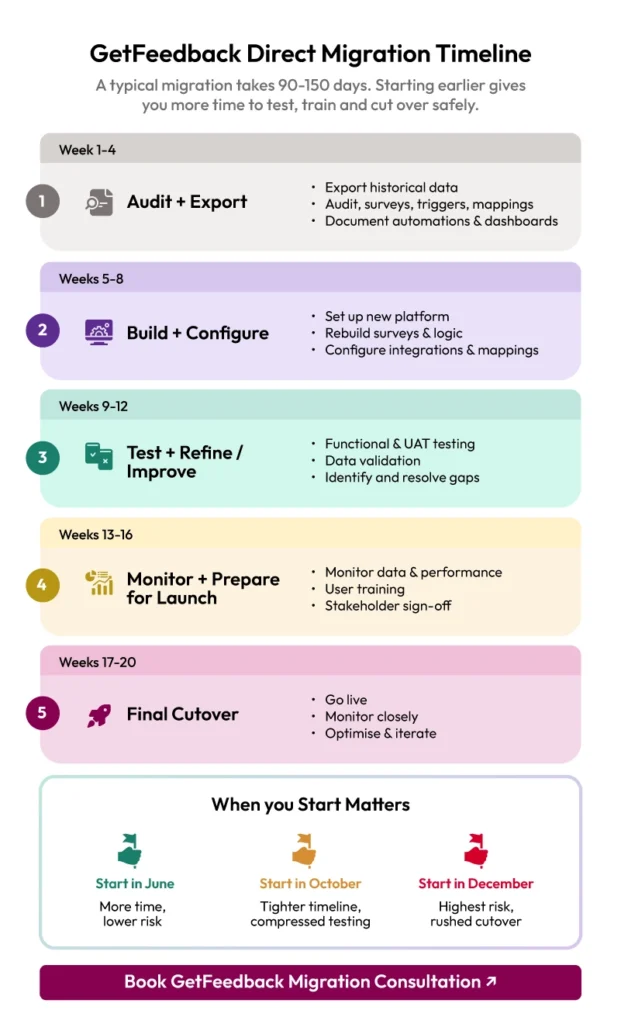
- A safe migration usually takes three to five months when you include audit, rebuild, testing, parallel running, and cutover.
You got the email. Or it landed in someone else’s inbox and made its way to you with a very unhelpful “FYI”. Or you are here because you Googled “GetFeedback shutting down” at 11pm and needed someone to explain what happens next without wrapping it in vendor fog.
Good news first: this is solvable. There is enough time to migrate well, protect your data and come out with a cleaner VoC programme than the one you started with.
Less cosy news: there are several moving parts, and the easiest-looking migration path may not be the right one for every Salesforce-heavy CX team. So let us walk through it properly.
What is actually happening?
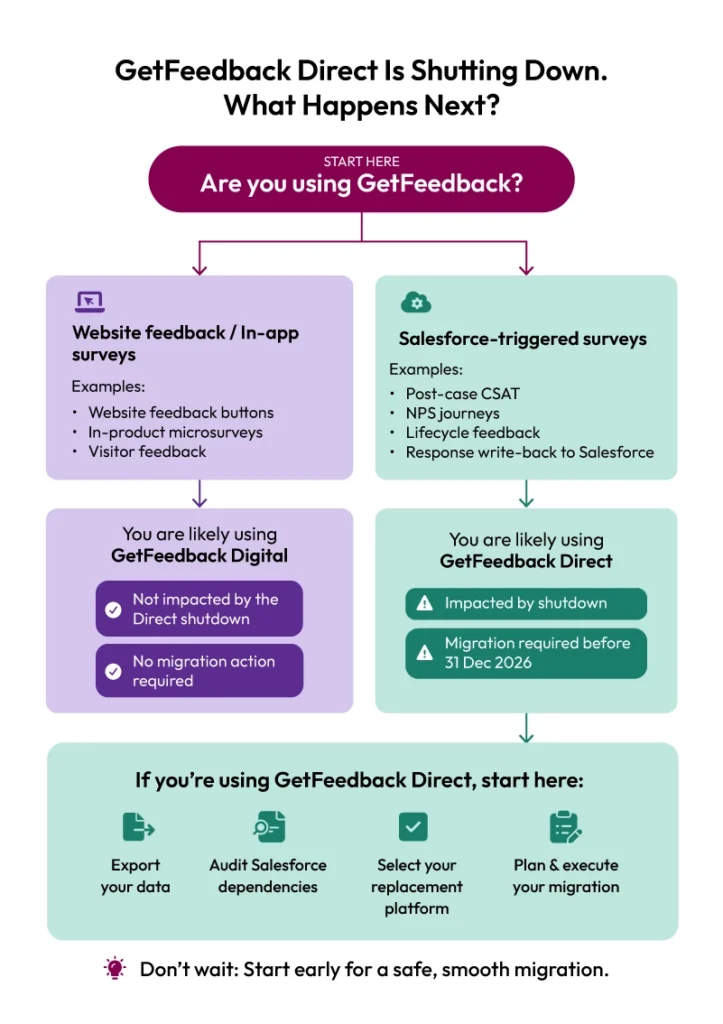
GetFeedback Direct is being sunset on 31 December 2026. This is the Salesforce-connected survey product used for relational and transactional customer feedback across the journey – things like post-case CSAT, onboarding NPS, lifecycle surveys and feedback workflows connected to Salesforce records.
GetFeedback Digital is not the product being shut down. SurveyMonkey has said GetFeedback Digital will continue to be supported under the GetFeedback name. That distinction matters, because the two products serve very different use cases.
If your team uses website feedback buttons or in-app micro-surveys, you may be using Digital. If your team sends personalised surveys triggered by Salesforce events and maps responses back into Salesforce, you are almost certainly dealing with GetFeedback Direct.
The deadline is firm: after 31 December 2026, GetFeedback Direct is no longer the platform to build your 2027 CX programme around. The practical question is not “is this happening?” It is “how do we move without breaking our feedback engine?”
Step one: protect the data before you pick the shiny new tool
Before you open a comparison spreadsheet, export your data.
This is the unglamorous bit, which is exactly why it gets delayed. But historical feedback is not just old survey rows. It is your trendline, your benchmarks, your verbatim history, your board-level NPS story and the proof behind years of customer experience decisions.
SurveyMonkey has confirmed the GetFeedback Direct sunset date, but it has not publicly detailed a full post-shutdown data retention policy for Direct. That means you should not build a migration plan on assumptions about future access.
There is a useful cautionary tale nearby. Delighted is scheduled to be sunset on 30 June 2026, and its support documentation states that customer data will be deleted after the final sunset date in line with local regulations. Different platform, different context, same sensible lesson: export first, strategise second.
At minimum, export:
- Raw response data
- NPS, CSAT and CES history
- Survey templates and configurations
- Question logic, distribution settings and customer variables
- Benchmarks and reporting views
- Respondent metadata used for segmentation
- Any Salesforce field mapping documentation you can access
Think of it like backing up your phone before a major repair – except this phone contains your customer history and the repair shop has a deadline.
The default migration path has a catch
SurveyMonkey is encouraging GetFeedback Direct customers to consider SurveyMonkey Enterprise. On the surface, this makes sense. Same parent brand, familiar ecosystem, and a migration path that sounds neat on paper.
But this is where CX teams need to slow down and ask architecture questions, not just feature questions.
GetFeedback Direct was built around Salesforce-connected feedback workflows. Many teams use it to trigger surveys from Salesforce events, pass Salesforce data into survey links, map responses back to objects and fields, and feed operational dashboards.
SurveyMonkey Enterprise offers Salesforce functionality through the SurveyMonkey for Salesforce integration. That integration can trigger surveys, push survey data back to Salesforce records and support object mapping. Useful, yes. Identical to GetFeedback Direct’s Salesforce-first operating model, no.
That difference becomes important when your programme is more than “send survey, collect response”. If you have case closure surveys, opportunity-stage surveys, low-score alerts, escalation workflows, custom objects, Salesforce reporting and multiple business units depending on the same data stream, you are not doing a neat switch. You are rebuilding the plumbing.
This does not make SurveyMonkey Enterprise the wrong answer for everyone. It may be a perfectly good fit for organisations that want a broader enterprise survey platform across HR, marketing, product and research. But for Salesforce-led CX programmes, the evaluation needs to be sharper than “it is the default option”.
The four things that actually break in a GetFeedback migration
The word “migration” makes the whole thing sound cleaner than it is. It sounds like moving a box from one shelf to another.
In reality, a GetFeedback migration is more like moving house while the lights need to stay on, the kettle still has to work and three people are asking why the Wi-Fi is down.
1. Survey triggers
Every Salesforce event that currently fires a GetFeedback survey needs to be identified, documented and rebuilt in the new platform. That includes case closure, opportunity won, onboarding milestones, renewal touchpoints, post-interaction follow-ups and any custom lifecycle moment your team has created over time.
The danger is not the obvious trigger. It is the one someone built three years ago for a specific team, then everyone forgot about because it kept working. Migration day has a very special talent for finding those.
2. Response data mapping
GetFeedback response data may be landing in custom Salesforce fields, standard objects, custom objects, related records, dashboards or workflows. A new platform does not inherit that logic by magic.
Every field needs to be checked. Every data type needs to be compatible. Every mapping needs to be tested. If your teams rely on Salesforce as the source of truth, this is not optional admin hygiene. It is the difference between useful feedback data and a dashboard full of mystery gaps.
3. Case creation and escalation automations
For many CX teams, the most valuable workflows are the ones that turn poor feedback into action. A detractor score creates a case. A negative comment triggers an alert. A high-value account with a poor experience gets escalated before renewal risk becomes a boardroom conversation.
These workflows are often business-critical. They are also often under-documented, because the person who built them is now in a different role, a different company or happily pretending not to remember.
Do not rely on these surviving the move by accident. They need to be mapped, rebuilt and tested deliberately.
4. Salesforce dashboards and reporting feeds
If a leadership team checks a Salesforce dashboard every Monday morning, and that dashboard depends on GetFeedback data, it needs a validated replacement feed before cutover.
Otherwise, the first person to notice the migration issue may be the person presenting the dashboard in a meeting. This is not the discovery moment anyone wants.
The good news: all four problems are fixable. The less fun news: they are not fast if you only discover them near the deadline.
The timeline reality check
31 December 2026 feels far away until you put the actual work on a calendar.
A properly managed GetFeedback migration typically includes:
- Integration audit: 2 to 3 weeks
- Vendor evaluation and internal approval: 2 to 4 weeks
- Integration rebuild and configuration: 4 to 6 weeks
- Testing and stakeholder review: 2 to 3 weeks
- Parallel running: 2 to 4 weeks
- Final cutover and validation: 1 to 2 weeks
That is roughly three to five months for a migration you can actually trust.
Start in June and you have room to breathe. Start in August and the margin gets thinner. Start in October and every dependency suddenly matters. Start in December and teams may end up compressing testing, approvals and cutover into a much tighter window. that absolutely nobody asked for.
The teams that have the smoothest start to 2027 will not be the ones with the prettiest vendor decks. They will be the ones that started with a proper dependency audit.
What to look for in a GetFeedback alternative in 2026
If you are building your shortlist now, do not just compare survey templates and dashboard screenshots. Those are table stakes. The bigger question is whether the replacement platform can support the way your CX programme actually runs.
Here are the questions worth asking early.
Is the Salesforce integration direct, managed and proven?
Ask how the Salesforce connection works. Ask what data is written where. Ask whether the vendor supports your object structure, field mapping, trigger logic and reporting needs. Ask what happens when a Salesforce sandbox is refreshed, an integration user is deactivated or a custom field changes.
A confident vendor will answer in specifics. A risky vendor will wave towards a help centre article.
Resonate CX is designed for Salesforce-connected CX programmes, with managed implementation and direct data workflows into Salesforce.
Who manages the integration build?
Some platforms sell you the software and leave your team to assemble the operational reality. Others manage the implementation with you – audit, configuration, testing, validation and cutover.
For a migration with a hard deadline, the difference matters. Your IT and Salesforce teams already have enough on their plates. They do not need a surprise second job called “rebuild the entire feedback programme”.
Resonate CX manages the integration build, so the migration is not left sitting in a support queue with a setup guide and good intentions.
What is the realistic implementation timeline?
Every vendor has a sales-friendly timeline. Ask for the operational one. How long does discovery take? When does configuration begin? How long does Salesforce testing take? How much time is needed for parallel running? What slows projects down?
Implementation timelines may vary depending on complexity, which gives teams time to test properly before GetFeedback Direct reaches its deadline.
Can historical data be preserved?
If your board, leadership team or customer-facing teams rely on NPS and CSAT trends, you need to know whether historical data can be imported, preserved or at least stored in a usable format.
Starting from zero may be acceptable for a small pilot. It is rarely acceptable for a mature CX programme with years of trend data behind it.
Use the migration as a programme audit
Here is the part that is easy to miss: a forced migration can actually be useful.
Most VoC programmes that have lived on one platform for years collect technical debt. Survey templates that no one has reviewed. Triggers that reflect old processes. Salesforce mappings from a CRM structure that no longer exists. Dashboards that everyone quotes but no one has inspected closely in months.
The GetFeedback shutdown forces the question: what should your programme look like now?
Not “how do we recreate the old setup as quickly as possible?” Not “what is the closest tool with the least change?” The better question is: “what feedback programme would we design if we were building it properly for the next three years?”
That is where the opportunity sits.
A good migration should help you:
- Remove outdated survey triggers
- Clean up Salesforce mappings
- Refresh survey templates and question wording
- Improve escalation workflows
- Reconnect feedback data to action, not just reporting
- Give leadership a clearer view of customer risk, loyalty and operational priorities
If you start early, you can be deliberate. If you start late, you are mostly rebuilding what you already had and hoping the gaps are small.
A practical GetFeedback migration checklist
Here is the simple version your team can actually use.
1. Confirm whether you are using GetFeedback Direct, GetFeedback Digital or both.
2. Export all response data, survey templates, benchmarks and historical reports.
3. Document every Salesforce trigger that currently sends a survey.
4. Map every Salesforce object, field and data type used for response write-back.
5. List all automations triggered by survey scores, comments or response status.
6. Identify every dashboard, report or downstream process that depends on GetFeedback data.
7. Shortlist replacement platforms based on Salesforce workflow fit, not just survey features.
8. Ask vendors who owns the implementation build and how long it really takes.
9. Plan a parallel run before final cutover.
10. Use the migration to clean up what has drifted, not just copy what exists.
Before you start exporting data or rebuilding workflows, use this complete GetFeedback migration checklist to make sure dependencies, Salesforce triggers, reporting layers, and automations are documented properly and nothing gets missed during cutover.
So, what now?
If GetFeedback Direct is part of your CX stack, the deadline is real. But this does not need to become a crisis migration. The safest move is to start with the fundamentals: export your data, audit your Salesforce dependencies and get clear on what a replacement platform needs to support.
Then choose a platform that can carry the operational weight of your programme – not just send surveys.
Resonate CX is built for organisations that want customer feedback to drive action inside the systems their teams already use. For Salesforce-connected CX programmes, that means managed implementation, direct data workflows, parallel migration support and an average three-week implementation.
GetFeedback shutting down may not have been on your 2026 bingo card. Fair. But handled properly, it can be more than a replacement project. It can be the clean-up, upgrade and reset your VoC programme has probably needed for a while.
Run an AI-powered CX program beyond surveys
See our platform in action. A live demo tailored to your organization’s needs.








Neha Pal
More Articles
-
- Blog

Employee Experience Software in 2026: 8 Platforms Across the Modern EX Stack
Choosing employee experience software is not as simple as comparing survey features. The category now spans employee listening, digital workplace tools, performance systems, recognition platforms, communication technology and enterprise experience-management… -
- Blog
8 Best Employee Feedback Platforms in 2026 for Different Feedback Needs
This guide compares eight platforms across different employee feedback needs, including continuous listening, qualitative analysis, manager feedback, enterprise EX, employee engagement and flexible surveys. -
- Blog
7 Customer Insights Platforms to Consider in 2026
Which customer insights platform can turn surveys, conversations, behavioral data and customer feedback into information your teams can actually use? The answer depends on what you mean by customer insight.



Resonate CX Resources

The Definitive Guide to Choosing the Right CXM Software
Choosing the right CXM software takes strategy, requiring you to define goals, assess integrations, and select a long-term partner.
Why Invest in a CX Platform: A Strategic Move for Competitive Advantage
Discover why a CX platform drives better experiences, loyalty, and sustainable growth.
Should You Invest in a Customer Experience Management Platform?
This guide walks through the five factors that determine whether now is the right time to invest.
How to Prove the ROI on CX to Your Board
Learn to prove ROI of Customer Experience by turning sentiment into revenue, retention, and risk insights.
4 Critical Signs You Need a New CXM Platform Solution
Is your CX platform holding you back? Data silos, stagnant metrics, slow insights, and poor integration signal it’s time to upgrade.
NPS Software Buyer’s Checklist: 47 Questions to Ask Vendors
NPS software helps you choose smarter with 47 key questions for better insights, workflows, and impact.
How to Combine NPS and Voice of Customer for a Complete CX Measurement System
Discover how NPS and VoC connect to turn feedback into loyalty and growth.
How Long Does CX Implementation Take? Timeline and Success Indicators
CX implementation timeline? Learn more about honest expectations and proven framework to accelerates success.