- Technology
SurveyMonkey Wants You to Migrate to Enterprise. Here’s What That Actually Means for Your Salesforce Setup.
Neha Pal
|
16 June 2026
TLDR:
- SurveyMonkey Enterprise may not be a like-for-like replacement for teams relying heavily on existing GetFeedback Salesforce workflows.
- The Salesforce integration is not included in base Enterprise plans — it is a paid add-on, which means the migration path SurveyMonkey is recommending costs more than the headline price suggests.
- GetFeedback field mappings do not transfer automatically. Teams should expect to review and potentially recreate custom objects, survey triggers, and response mappings depending on implementation complexity.
- SurveyMonkey Enterprise was designed as a multi-department survey platform — HR, marketing, research, CX. If your programme needs dedicated CX architecture and Salesforce depth, the migration may involve a different operating model and total cost profile than teams initially expect.
- Before defaulting to the recommended migration path, run it past the four questions in this article — the right platform for your Salesforce setup will answer all four cleanly, and the wrong one will hedge on at least two.
You are being handed a lifeboat.
Someone should probably mention that the boat you are leaving and the boat you are boarding have different engines, different navigation systems, and the second one requires you to rebuild the hull before you can sail it.
SurveyMonkey is actively encouraging GetFeedback Direct users to migrate to SurveyMonkey Enterprise. The pitch is clean: same company, familiar ecosystem, makes sense to stay. And for some teams, it genuinely is the right move.
But for teams running CX programmes deeply connected to Salesforce — case closure surveys, post-onboarding NPS, lifecycle CSAT firing from Salesforce events — there is a foundational difference between what GetFeedback was and what SurveyMonkey Enterprise is. That difference has real operational consequences, and most people will not find out about them until they are already mid-migration.
So here it is, before you sign anything.
What GetFeedback Direct Actually Was
GetFeedback Direct was a Salesforce AppExchange managed package. That is the key phrase. It did not connect to Salesforce from the outside. It lived inside your Salesforce org.
Your surveys were built within the Salesforce environment. Your field mappings persisted because the survey data and the CRM data existed in the same system. When a Salesforce event fired a survey, it was happening inside your org — not triggering an external platform and waiting for data to come back through a connector.
This is why GetFeedback felt native to Salesforce users. Because it was.
What SurveyMonkey Enterprise Actually Is
SurveyMonkey Enterprise is a multi-department survey platform. It was built to serve HR teams running engagement surveys, marketing teams running brand research, research teams running panels, and CX teams running NPS programmes. One platform, many use cases.
That is not a criticism. It is just a description. And the description matters, because it explains the architecture.
SurveyMonkey Enterprise connects to Salesforce via an external integration — data flows between two separate systems, rather than living natively inside your Salesforce org. The integration is an AppExchange app, but the survey platform itself is external. The experience for your CX team is meaningfully different from what they had in GetFeedback.
There is also a practical detail worth knowing: the Salesforce integration is not included in base Enterprise plans. It is a paid add-on. The migration path that SurveyMonkey is recommending has a higher total cost than the headline Enterprise pricing implies.
The Three Things That Do Not Survive the Migration
SurveyMonkey is transparent about this in its own documentation: GetFeedback field mappings do not transfer automatically when you migrate to Enterprise. You must rebuild them.
Here is what that actually means in practice.
Your field mappings — all of them
Every mapping between a GetFeedback survey response and a Salesforce field was configured inside your org. Custom objects, standard objects, NPS score fields, verbatim text fields, calculated fields. None of it moves across. You are starting from a blank canvas in a system with a different architecture.
For CX programmes that have been running for two or three years, this is not a minor rebuild. This is a project.
Your survey triggers
Every Salesforce event that currently fires a GetFeedback survey — case closed, opportunity won, contact milestone, 30-day onboarding complete — was configured inside your Salesforce org. In SurveyMonkey Enterprise, triggers work differently because the platform sits outside your org. The trigger logic needs to be rebuilt, and in some cases, the specific trigger types that GetFeedback supported natively are either unavailable or require additional configuration in the new architecture.
This is especially worth auditing if you have complex trigger logic built on Process Builder or Salesforce Flows. The rebuild is not impossible — it is just not automatic.
Your case creation automations
If your programme generates Salesforce cases automatically when a customer gives a low NPS score, that workflow was configured inside your Salesforce org using GetFeedback’s native capability. Moving to an external connector means that automation needs to be rebuilt using Salesforce Flows or Apex that reference the incoming data from the connector – a different approach that requires Salesforce admin time and testing.
These automations are almost always the most business-critical flows in the programme, and almost always the least documented. Discovering mid-migration that a key one is not supported in the new architecture is not a great moment.
The Pricing Reality
Here is the sentence that appears in SurveyMonkey’s own documentation: the Salesforce integration requires an Enterprise plan plus an additional integration purchase.
So if you are pricing the migration on the basis of a standard Enterprise contract, that number is not the full number. The Salesforce integration piece is additional.
For teams running a full Salesforce-connected programme, the all-in cost of SurveyMonkey Enterprise with the required integration is worth modelling explicitly before the contract goes to procurement. Not because it will necessarily be prohibitive — but because surprises at contract stage are avoidable.
Understanding the business case for investing in a CX platform helps frame this conversation internally. The total cost of platform ownership, including integration costs and implementation time, is what should be in the model, not just the headline subscription.
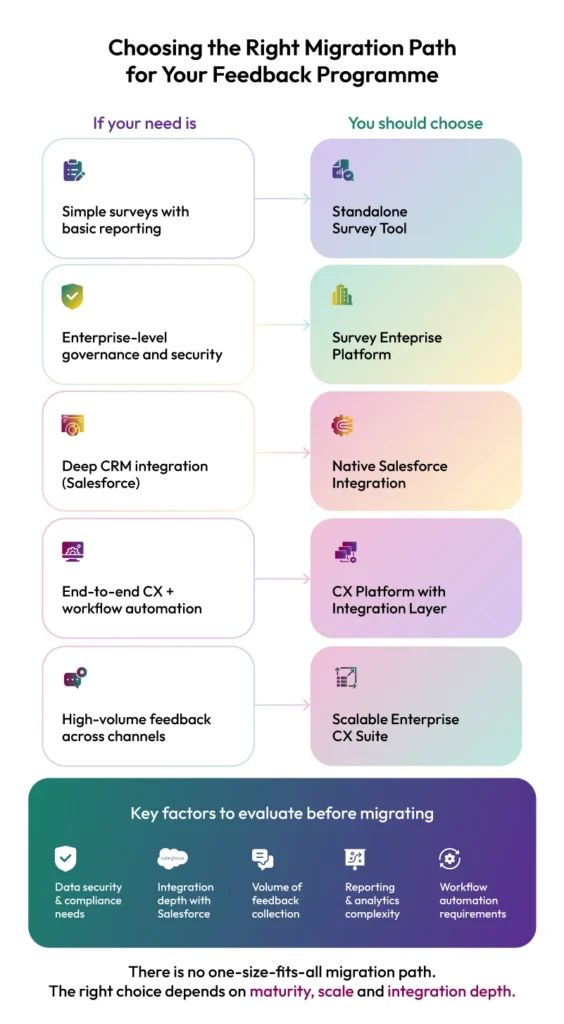
This is not a hit piece, so let us be fair.
SurveyMonkey Enterprise may be a reasonable fit when:
- You want one platform across multiple teams and use cases — such as customer feedback, market research, and employee feedback.
- Your Salesforce workflows align with the integration model and you are comfortable reviewing and adapting existing survey logic during migration.
- You are using the migration as an opportunity to simplify or redesign how feedback operations run.
If those conditions reflect your setup, the migration path SurveyMonkey is recommending could make sense.
The challenge is that not every GetFeedback Direct customer starts there. Some teams have deeply embedded Salesforce workflows and operational dependencies that are worth evaluating before assuming a like-for-like transition.
Understanding whether you are simply replacing survey software or preserving an existing CX operating model is often the decision that shapes the migration outcome.
What to Look for Instead (Where the Right Answer Gets Obvious)
Here are the four questions that separate the platforms built for this scenario from the ones that are being positioned for it.
Is the Salesforce integration native — does it live inside your Salesforce org — or does it connect externally?
This is the architectural question that everything else flows from. Native means the integration lives inside your org, field mappings persist without external sync, and triggers fire as Salesforce events. External connector means you are managing data flow between two systems, with all the latency, dependency, and maintenance that implies.
GetFeedback was native. The platform you migrate to should answer this question clearly and specifically. If the answer requires more than one sentence to explain, that is information.
Resonate CX is Salesforce-native. The integration lives inside your org. No external connector, no middleware.
Who manages the Salesforce integration build and ongoing maintenance — your team or theirs?
SurveyMonkey Enterprise’s Salesforce integration documentation is thorough and detailed, which is another way of saying your admin team will be reading it. The build, the field mapping configuration, the trigger setup — these are tasks your team inherits.
For CX programmes with complex Salesforce setups, the question of who owns the integration is not a minor implementation detail. It is an ongoing resourcing commitment.
Resonate CX manages the integration build. You get an implementation team, not a setup guide.
What is the honest implementation timeline?
Not the best-case scenario. The honest one — accounting for the audit, the rebuild, the parallel running period, and the sign-off process.
SurveyMonkey Enterprise’s own guidance suggests 90 days for a standard migration. For complex Salesforce programmes with custom objects and automations, 90 days is an optimistic baseline.
Resonate CX’s average implementation is three weeks. That is not a typo, and it is not because we skip steps — it is because the native architecture means there is significantly less to rebuild.
Can you run both platforms in parallel before cutting over?
You need to be able to run GetFeedback and the new platform simultaneously, compare response data, validate that triggers are firing, confirm that cases are being created correctly, and only cut over when everything checks out. This is how safe migrations are done.
Any platform that cannot support parallel running is a meaningful risk when the hard deadline is December 31, 2026.
For a structured way to run this evaluation before you get to demos, the NPS software buyer’s checklist with 47 vendor questions gives you the full framework. And the guide to selecting a VoC platform covers the broader decision criteria if you are using this migration as an opportunity to upgrade, not just replace.
The Migration That Actually Works
The teams that come out of this well are the ones who resist the path of least apparent resistance long enough to ask the right questions.
GetFeedback being an AppExchange managed package was not a coincidence — it was the architecture that made deep Salesforce integration work cleanly. If your programme depends on that depth, the right replacement is the platform that matches it, not the one that shares a parent company.
Rebuilding your integration on a connector-based architecture while racing toward a December deadline is not a migration strategy. It is a gamble.
If you are at the stage of evaluating options and want to understand what a genuinely native Salesforce implementation looks like in practice, the guide to building a VoC programme from feedback to action covers the programme design conversation, and the 4-step approach to turning customer data into insights is worth reading before you finalise your architecture requirements.
The top challenges when running a VoC programme is also a useful benchmark — because the most common failure modes in CX programmes are structural, and a platform migration is a rare opportunity to fix them before they follow you to the new system.
Run an AI-powered CX program beyond surveys
See our platform in action. A live demo tailored to your organization's needs.








About the Author
Neha Pal
More Articles
-
Blogs

- Customer Experience
- |
- Feedback Management
- |
- Retail
- |
- Voice of the Customer
How Retailers Use Experience Data to Make Smarter Product and Category Choices
By Alvier Marqueses• 10 June 2026Sales data tells you what sold, not what customers wish you stocked or why they left empty-handed. Learn how to use experience data to sharpen management decisions. -
Blogs
- Complaints Experience
- |
- Feedback Management
- |
- Retail
- |
- Voice of the Customer
Creating a Retail Complaints Process: Why Logging Grievances Drives Customer Loyalty
By Aryne Monton• 4 June 2026Discover why most retail complaints never get logged, the hidden costs of missed feedback, and how a structured complaint process can turn customer dissatisfaction into actionable insight for stronger loyalty... -
Blogs
- Customer Experience
- |
- Feedback Management
- |
- Voice of the Customer
Closing the Measurement-Reality Gap in Customer Feedback
By Alvier Marqueses• 3 June 2026Discover the 3 gaps hiding the truth in your CX data and how integrating text analytics and multi-channel listening reveals what customers really think.